Mastering SQL: the 20% of SQL that will power 80% of your work (2/10)
If you haven't read it article #1, on why SQL still matters & why you should focus on it in your career, is still available here.
Previously on this series, we saw that SQL had 5 levels of mastery:
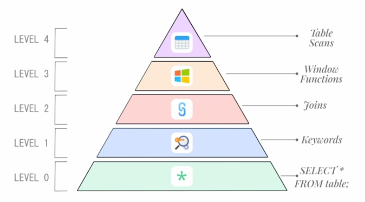
Today, we'll focus on level 0 to 2 – the basics, the 20% that will power through 80% of your job:
- Level 0: Understanding data scans,
- Level 1: Understanding SQL keywords and you they work together,
- Level 2: The different types of Joins and when to use them
Level 0: Understanding the concept of data scan
To understand the concept of data scan, you first have to understand a few concepts about how a database really works. This explication if focused on databases, not data lakes or data lakehouses, but the logic is essentially the same.
Conceptually, there are 5 parts to a database:
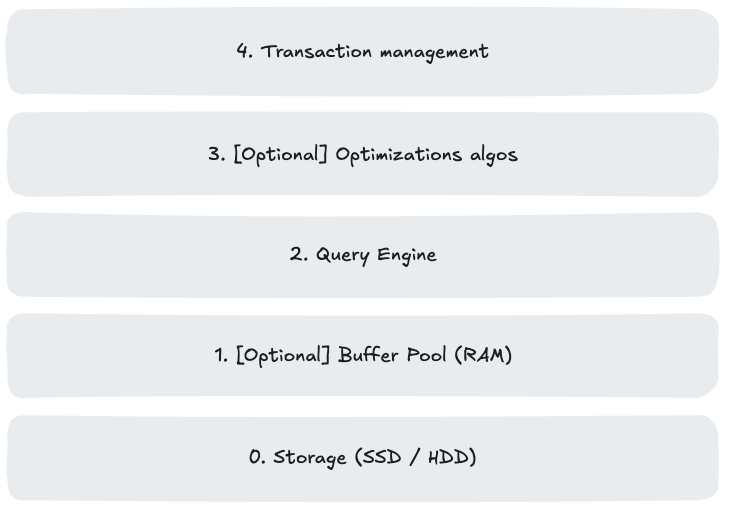
For now, let's focus on parts 0 to 2.
Since I am just trying to make you understand concepts here, I won't go into too much details & keep things as simple as possible:
- 0. Storage (SSD / HDD)
- At the very bottom, your data lives on physical storage devices - typically SSDs or hard drives. Based on the technology you're using (Big Query vs. Snowflake for instance), your data is handled by the system to make it easily available to query.
- For instance, when you have a table with customer records, the database engine maintains detailed maps of where everything lives - what file contains what information etc.
- 1. Buffer Pool / Caching mechanisms (RAM)
- The buffer pool / caching is essentially a smart cache in RAM. When you query for data, the database doesn't immediately hit the slow storage device. Instead, it checks if those data pages are already loaded in memory. If they are, you get lightning-fast access. If not, it loads the required pages from storage into the buffer pool.
- This cache is constantly managing itself, keeping frequently accessed data in memory while pushing less-used data back to storage when space is needed.
- 2. The Query Engine
- Note: The Query Engine logic also depends on the technology you're using - Big Query one, for instance, won't be the same as Snowflake's.
- When you write a SQL query, the database's query engine becomes your translator and optimizer.
- It parses your request, figures out the most efficient way to execute it, and creates an execution plan.
- This might involve deciding which indexes (if available) to use, what order to join tables, or whether to sort data in memory or on disk.
To summarize, when you write a select * from table:
- Your request is analyzed by the query engine, which creates an execution tree,
- (The system checks if data is available in cache),
- The system gets your data and executes the execution tree (here a very simple tree to get you the whole data from the table).
This process of getting the data from storage is what we call a data scan (this does not have any significance just yet but will be used later).
Level 1: Understanding SQL keywords and you they work together
SQL syntax
Now that you know the broad concepts about how a database works, let's focus on SQL syntax.
On your SQL journey, you will encounter many keywords. The goal here is to give you an overview of the keywords you will use the most:
select: used to choose the columns you want from the data,from: used to choose the table you want to query,where: used to filter the data you want to queryorder by: used to order the data you want to query,limit: used to limit how much rows of data you'll get at the end of your query execution
For instance, supposing we have a user table like so:
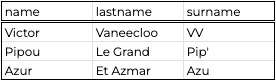
Users tableIf I just want the data that links user_id:
select
  name
  , lastname
from
  Users
Query #1
I will get:
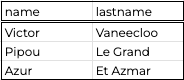
If I want only Victor's surname, I'll do:
select
  surname
from
  Users
where
  name = "Victor"
Query #2
I will get:

And finally, if I want all data, ordered by surname alphabetical order, only for names with an "i" in them, I'll do:
select
  *
from
  Users
where
  name like "%i%"
order by
  surname asc
Query #3
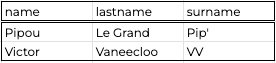
As you understand, you can do a whole lot with SQL.
To become proficient (if you're not already) with the basics, I advice you use MODE SQL tutorial for Data Analysis:


This will give you an overview of what's possible with SQL & make you capable of handling easy medium requests.
To be fair, there are things that I did not explain here, like aggregation functions, window functions etc. – this is become this will be done at a later date.
SQL execution order
To become truly proficient with the basics and attain level 1, you need to be aware of how your query is understood by the system.
By default, the SQL you'll write will be executed in the most efficient order by the query engine.
This means that when you're writing:
select * from table where column1 = "a";The system does not read it from left to right like we humans do. It will read your query in this order:
from > where > select
This is the more efficient path – because it first filters the data you need – the one that validates the where clause before querying you the data.
The order in which SQL is executed in the data warehouse will always be:
- FROM / JOIN
- WHERE
- GROUP BY
- HAVING
- SELECT
- ORDER BY
- LIMIT / OFFSET
This is important to keep in mind to write efficient queries.
Level 2: The different types of Joins and when to use them
This is where data gets exciting. You can join multiple tables in other tables to enrich your data. This process is done with the join keyword (duh!).
There exists multiple types of join and the ones you'll use 90-95% of times are:
left joininner join
Of course there exists other types (right join , cross join, full outer join etc.), I'll let you find informations about those on your own if you're interested.
left join
The syntax of a left join looks like that:
select
  a.*
  , b.*
from
  a left join b
  on a.key = b.key
Let's define each term of the query:
a: the a table,a.*: the syntax to have all columns froma,b: the b table,b.*: the syntax to have all columns fromb,key: the key on which you can join the tables
Now, let's work with an example, supposing you have 2 tables:
- Table #1:
Userswhich represents the known users of a website that sells plumbing items
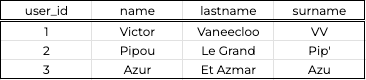
Users table- Table #2:
Transactionswhich represents the transactions made on the same website
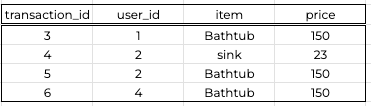
Transactions tableNow, if you were the plumbing website business owner, a question you would ask yourself is what user has purchased most on the website ?
And, without joins, you'd be hard pressed to find the answer. But no more !
Here's what you'd do to answer this question:
select
  *
from
  Transactions left join Users
  on Transactions.user_id = Users.user_id
order by
  user_id
Join #1
What this will do in practice is:

The result of the query would be:

We can clearly see that Pipou was the one who made the most purchase in the plumbing website.
Although something is weird! We actually don't have any infos about user_id = 4 in our user table.
Supposing this transaction is a website bug, how do we make sure we do not count the transactions associated with user_id = 4 ?
inner join
The previous question can be answered with an inner join.
Now that you know what a left join is, you'll see that an inner join is quite the same, but with a little subtlety.
Again, the syntax of an inner join looks like that:
select
  a.*
  , b.*
from
  a inner join b
  on a.key = b.key
Let's define each term of the query:
a: the a table,a.*: the syntax to have all columns froma,b: the b table,b.*: the syntax to have all columns fromb,key: the key on which you can join the tables
Let's work on the same question as before while focusing on handling website bug:
select
  *
from
  Transactions left join Users
  on Transactions.user_id = Users.user_id
order by
  user_id
Join #2
The logic is actually exactly the same:
The only difference with the left join is that, since there are no data in the Users table for user_id = 4 this row will just disappear from your result table:

With big datasets, this can become a huge performance to use an inner join instead of left join – keep this in mind when working with real data!
Conclusion
To sum up this article, we explored level 0 to 2 of Zach Wilson's SQL mastery pyramid.
Now, you should know concepts like query engines, storage layers, sql keywords & joins and how to use them.
Next time (article #3/10), we'll focus on Aggregates & Window functions: a powerful tool at your disposal .
Subscribe to my newsletter to get an email when this article drops.
Thanks for reading & don't hesitate to comment !

Struggling with your data analytics project? Let's fix it together.
I help teams solve tough data problems — fast.