Supercharging dbt: performance, working at scale & trade-offs (1/3)

In this series of article, I’ll explore what breaks at scale, and how to fix it.
Over the past few years, dbt has become the go-to standard for data engineering and analytics. And for good reason. dbt Labs, the company behind the product, was the first to introduce a structured SQL-based framework to manage data transformations — something the modern data stack desperately needed.
Before dbt, every company built their own tools
Before dbt came along, most companies built custom transformation frameworks—typically a mix of Airflow, raw SQL scripts, and internal best practices. These setups worked… to an extent. But they were often brittle, not very flexible, and far too technical for analysts to contribute to without heavy engineering support.
Then came dbt. It bridged the gap between engineering and analytics, making SQL workflows more approachable, version-controlled, and testable. Naturally, it took off.
The new problem: the illusion of governance
But here’s what I’ve observed throughout my freelance career: as much as dbt enables teams, it also often becomes a mess.
Once it’s in place, dbt projects can quickly spiral into a spaghetti bowl of models —unmaintained, undocumented, and often disconnected from real business needs. Governance falls apart. Ownership blurs. You end up with hundreds (sometimes thousands) of models that no one understands anymore.
In short: dbt can become a liability if not handled carefully.
I still love dbt — but it needs discipline
Let me be clear: I love dbt. The core idea: providing a standardized transformation framework that prevents every company from reinventing the wheel is brilliant. As a data practitioner, I don’t want to write the same logic over and over again. And dbt helps avoid that.
But loving a tool doesn’t mean ignoring its flaws.
The 2 million dollar questions are:
- How do we scale dbt without losing control ?
- How do we manage thousands of models while keeping delivery sharp, governance clear, and business alignment intact?
That’s what this series of articles is about
With this article, I begin a series of 3, which will be my attempt to explore those questions. I don’t pretend to have all the answers. But if you come away from this article with even one useful idea for managing dbt better, then it’s done its job.
Let’s dive in.
This article will be divided into 3 to keep things easy to read:
I. Overclocking dbt [*], (1/3)
II. Keeping quality as high as possible while maintaining governance, (2/3)
III. Interfacing dbt & Airflow (3/3)
Here, we'll focus on the first part - Overclocking dbt.
[*] Kudos to Chris Dong for coming with with this formulation, here's his super interesting article:
 Chris DongApril 9, 2025
I. Overclocking dbt
Let’s start with a reality check: for the vast majority of companies, think 90 to 95%, building a fully custom solution like Discord’s simply isn’t realistic. And frankly, it’s not necessary.
In most cases, dbt already covers everything you need out of the box - you just need to tweek it a bit.
The 4 biggest dbt performance killers (and how to fix them)
1 - Full tables scans
As always, avoid SELECT * at all cost:
-- ❌ Avoid this - even though dbt Labs clearly push for this syntax

with
  cte as (
  select * from {{ ref('some_table') }}
)

select * from cte

-- ✅ Do this instead
with
  cte as (
    select
      column1
      , column2
      , column3
    from
      {{ ref('some_table') }}
    where
      some_filter
  )

select * from cte
Optimize your table scans
2 - Full instead of incremental tables
To me, the main dbt performance killer is the dbt Labs given advice to use full tables instead of incremental tables.
I don't agree with this idea. Working with incremental is not always more complicated - even more so when you're handling the whole lifecycle of data (ingestion to fact / dim tables) and it certainly brings more benefits: costs reduction, faster pipelines, easy & cost-performant backfills etc.
If you're a traditional dbt practitioner, I think you'll probably don't like this next sentence – which is the essence of the approach I propose:
Note: this is not always true for dimension type tables.
That's it. It's not fancy – there's no AI in there – but this still works well. To decrease your processing costs & time, you need to reduce the amount of data you're moving.
Seems basic right ? In my experience, not so much.
Now, incremental tables requires more team alignment than full tables – it certainly does not work out of the box, and can become messy if not done right.
This begs the question: how should you setup your dbt incremental logic ? Well, let's dive in.
- Capitalize on dbt vars,
To make incremental models work consistently across your project, you need a pattern for time-based filtering. That's where vars come in.
What's great about dbt is the possibility to add vars to your pipelines easily, for instance, you can:
select
  column1
  , column2
  , column3
  , column4
  , column5
  , ingestion_date
  , updated_date
from
  {{ source('dataset', 'source') }}
where
    ingestion_date
      between {{ var('event_start_date') }} and {{ var('event_end_date') }}
your_model.sql
You can then use those vars in your dbt invocation:
dbt run -s your_model --vars '{event_start_date: 2025-01-01, event_end_date: 2025-02-01}'Invoke dbt with vars
My advice would be to setup your data sources using variables (always the same variables for tables at the same grain). This would effectively blocks someone to use any data source without any kind of date filtering logic.
Then, I would setup defaults in the the dbt_project.yml:
vars:
  event_time_start: "current_date()"
  event_time_end: "current_date() - 7"
dbt_project.yml
Based on your setup, you'd have to change syntax here.
- Handle interval logic based on env
If you want to go even further, you could also setup the variables like so (still in the dbt_project.yml ):
vars:
  event_time_start: "current_date()"
  event_time_end: "{{ get_default__event_time_end(var('event_time_start')) }}"
dbt_project.yml
This would use the macro get_default__event_time_end , which could decide on a time interval based on your environment:
{% macro get_default__event_time_end(event_time_start=None) %}
  {% if event_time_start == None %}
    {% do raise ValueError("event_time_start cannot be None") %}
  {% endif %}

  {% if target.name = "dev" %}
    {% set interval = 7 %}
  {% elif target.name = "preprod" %}
    {% set interval = 60 %}
  {% elif target.name = "prod" %}
    {% set interval = 90 %}

  {% do return(event_time_start | string ~ " - " ~ interval | string) %}
{% endmacro %}
get_default__event_time_end.sql
This macro is equivalent to having:
event_time_start: "current_date()"
event_time_end: "current_date() - 7"
On dev
event_time_start: "current_date()"
event_time_end: "current_date() - 60"
On preprod
event_time_start: "current_date()"
event_time_end: "current_date() - 90"
On prod
I would advise to only setup this on dev / preprod as it can lead to unforeseen issues in prod (for example forgetting to setup your vars).
These macros would effectively deter your people to work with too much data in a given environment while still keeping it flexible & without any hassle.
3 - Use views for easy debugging
Barring from any performance issue in your pipeline - you should use views instead of ephemeral code for easy debugging.
Of course, when your pipeline just takes to much time / I/O; this may be a good idea to look at materialization between your source & final table.
For instance, consider this pipeline:
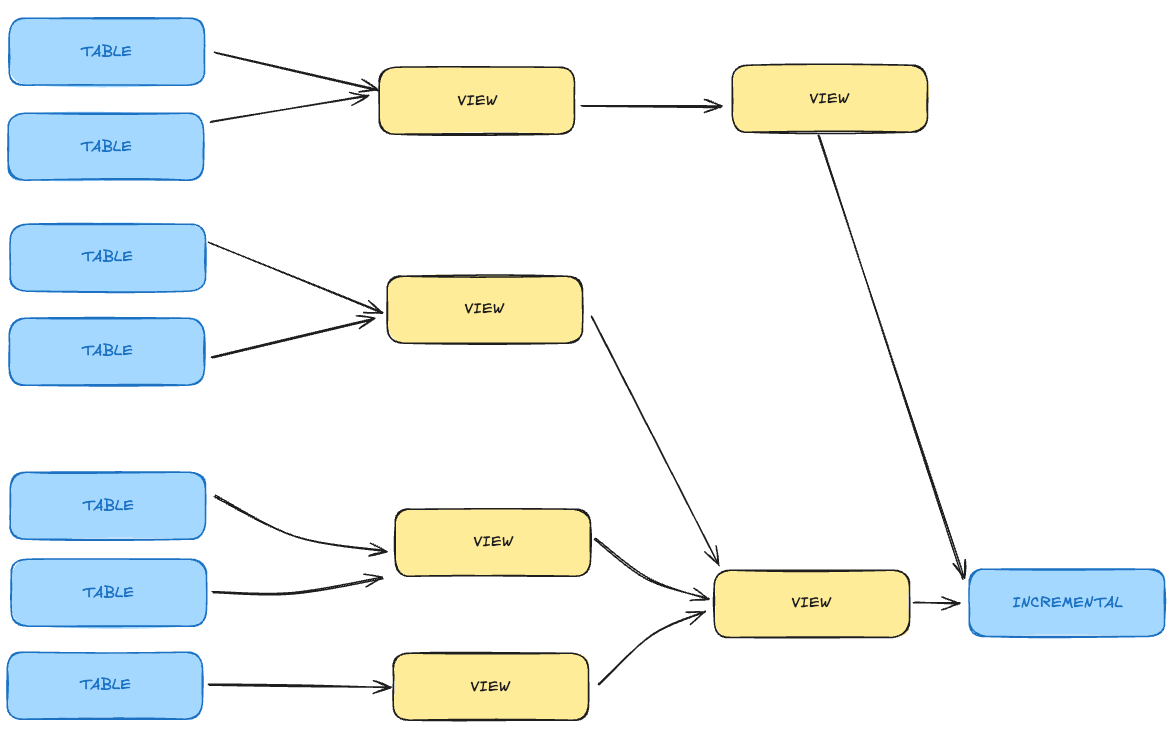
You may want to materialize some views into table to tackle performance issues:
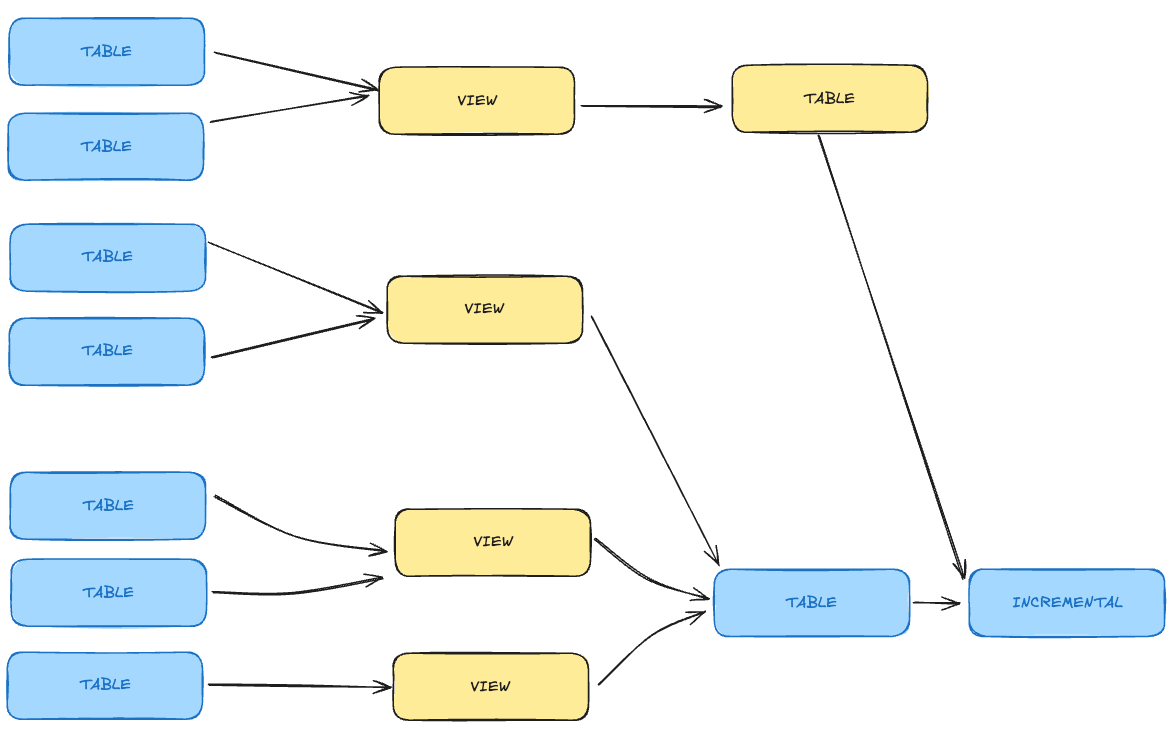
The official dbt recommendation states that whenever you're chaining > 4 views - you'd probably gain performance by materializing them into table.
In my personal experience – it depends on the volumetry of data you're working with.
Test things out and check the associated query profiles – it may surprise you!
4- Set-up incremental materialization in your final tables
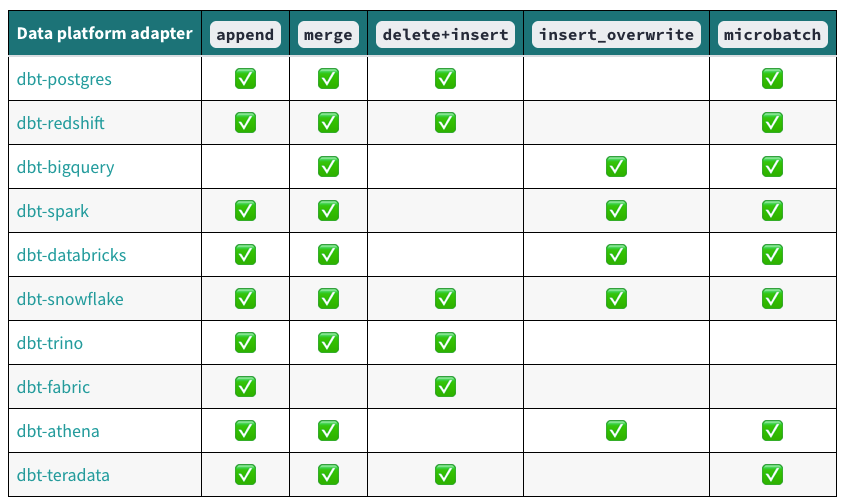
Based on your Cloud Provider, you may (or not) have access to materialization types:

See dbt documentation for more informations
Here's how you would setup this in your project on Big Query:
{{ config(
    materialized='incremental',
    incremental_strategy = 'merge',
    unique_key = ['primary_key'],
    incremental_predicates = 'current_date() between "{{ var('event_time_start') }}" and "{{ var('event_time_end') }}"'
    # Only scan the table between the considered interval
) }}
final_table.sql
This config will make sure that you only scan the data you need to scan and only merge the data you need. This is both elegant and efficient – which will keep your cost low.
Conclusion
Key Takeaways
- Avoid full-table scans filter early and often,
- Default to
incrementalmaterializations as much as possible, - Materialize models when performance is needed,
- Use
vars+macrosto enforce lightweight filtering on ingestion date whenever possible,
Conclusion
As your dbt project grows, so will the number of models, and inevitably, the technical debt. That’s just the nature of software projects (unfortunately).
What I’ve learned during my freelancing career is this: a team is only as effective as the systems and guardrails it puts in place early on.
If you want to move fast later, you need to go slow at first: take the time to deeply understand your current and future use cases, and design your systems accordingly.
That’s why my strongest advice is this: before scaling your dbt project, invest time in writing down clear conventions, defining best practices, and aligning the team.
It’s not glamorous, but it’s the foundation that keeps everything from collapsing when scale hits.

Struggling with your data analytics project? Let's fix it together.
I help teams solve tough data problems — fast.